🛍️ AI-Powered Amazon Listing Optimizer – Project Overview
Welcome to a behind-the-scenes breakdown of our AI-powered platform designed to enhance Amazon product listings through automated analysis, A/B testing, and real-time user feedback. This tool is crafted to help sellers optimize their listings, boost conversions, and stay competitive, all powered by cutting-edge LLMs and intelligent scraping agents.
🔗 Project Links
- GitHub Repository Frontend
- GitHub Repository Backend
- PypI Page Amazon Scraper
- Live Link (scraper not working on prod..😢/prefer local setup)
- Video Demo
⚙️ Tech Stack
Here's a peek into the technologies powering this AI-first Amazon product enhancement suite:
🧠 AI Models
LLaMA-4 Maverick— Local LLM for sentiment analysis, product enhancement, and copy generationGPT-4o— Context-rich reasoning and fallback for complex queriesLangChain— LLM orchestration, agent routing, and prompt management
🧰 Frameworks & SDKs
FastAPI— High-performance Python backend for APIsNext.js— React-based frontend framework for dynamic UIDrizzle ORM— Type-safe ORM for interacting with PostgreSQLZod— Schema validation for forms and API dataZustand— Lightweight state management in the frontendPigeon Maps— IP tracking and geolocation mappingBeautifulSoup + Playwright— Headless scraping and DOM parsing engine
💻 Code & UI
ShadCN UI— Accessible and elegant UI componentsTailwind CSS— Utility-first styling for consistent designMonaco Editor(coming soon) — Rich text/code editing for custom copy tweaks
☁️ Storage & Infrastructure
PostgreSQL— Relational database for persistent storageAmazon EC2— Cloud instance for hosting the backend servicesDocker— Containerized deployments for portabilityNginx— Reverse proxy and server manager
🚀 CI/CD & Deployment
GitLab CI— Automated testing and deployment pipelinesAWS EC2— Hosting the FastAPI backend with DockerNginx— Serving static frontend & proxying backend endpoints
🔍 Product Overview Page
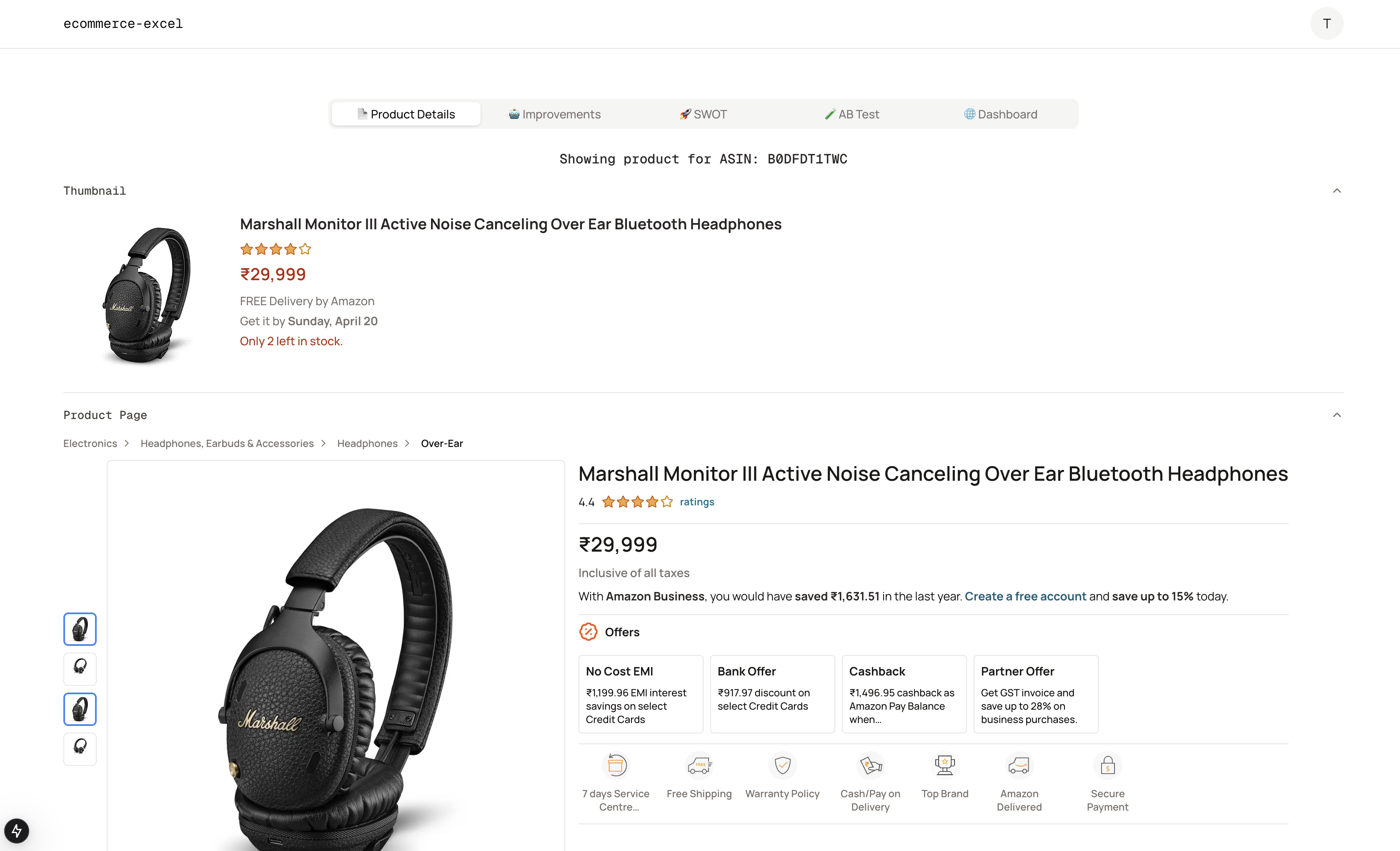
Given a product’s ASIN, our backend scraper engine fetches essential data from the Amazon product page, including:
- Title
- Product Images
- Price
- Reviews
- Product Details
This scraped data is cached and stored in the database, so each product is only processed once. The UI then displays this information in a layout that mimics the familiar Amazon interface, ensuring users feel right at home.
🛠️ Product Enhancement Agent
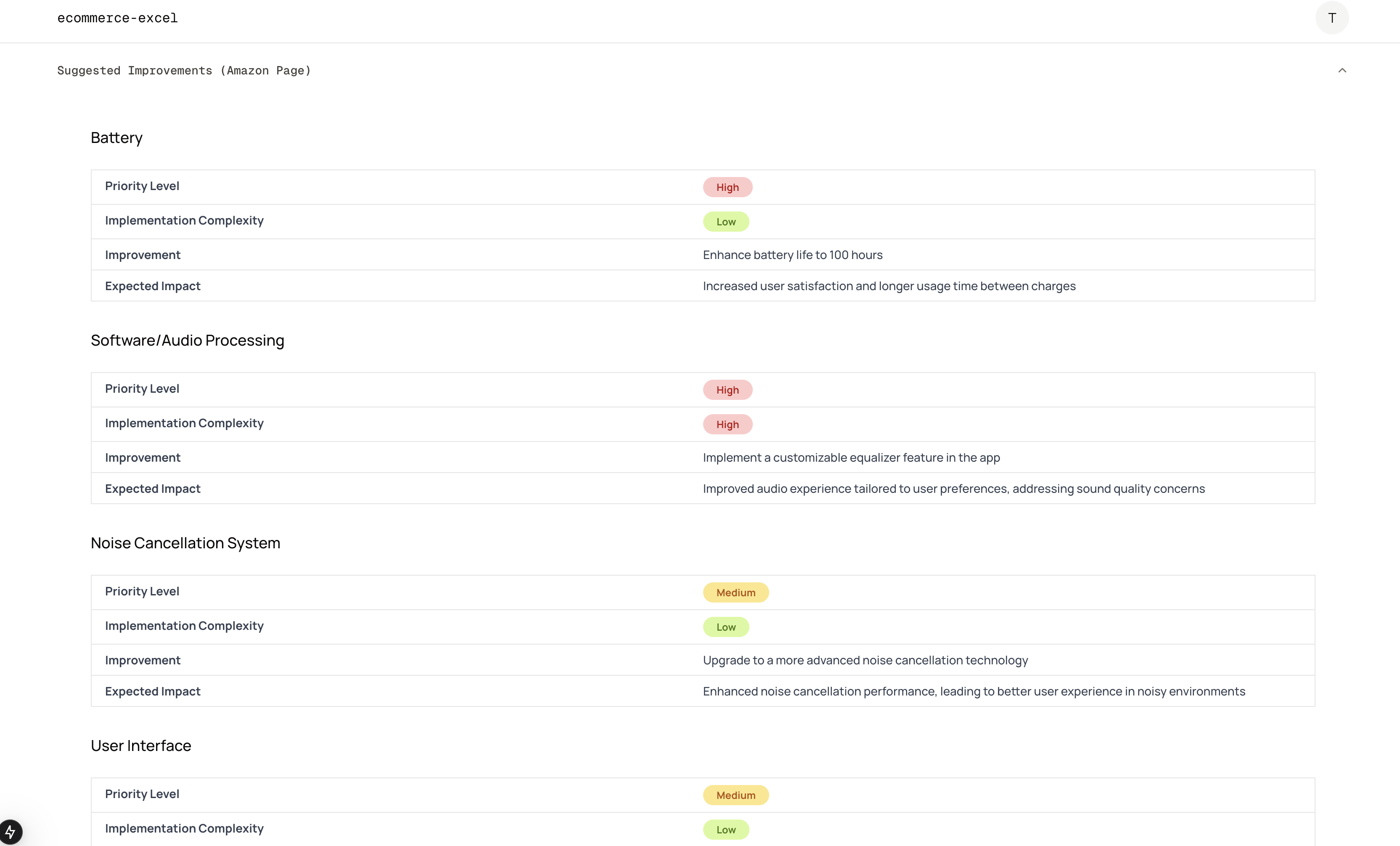
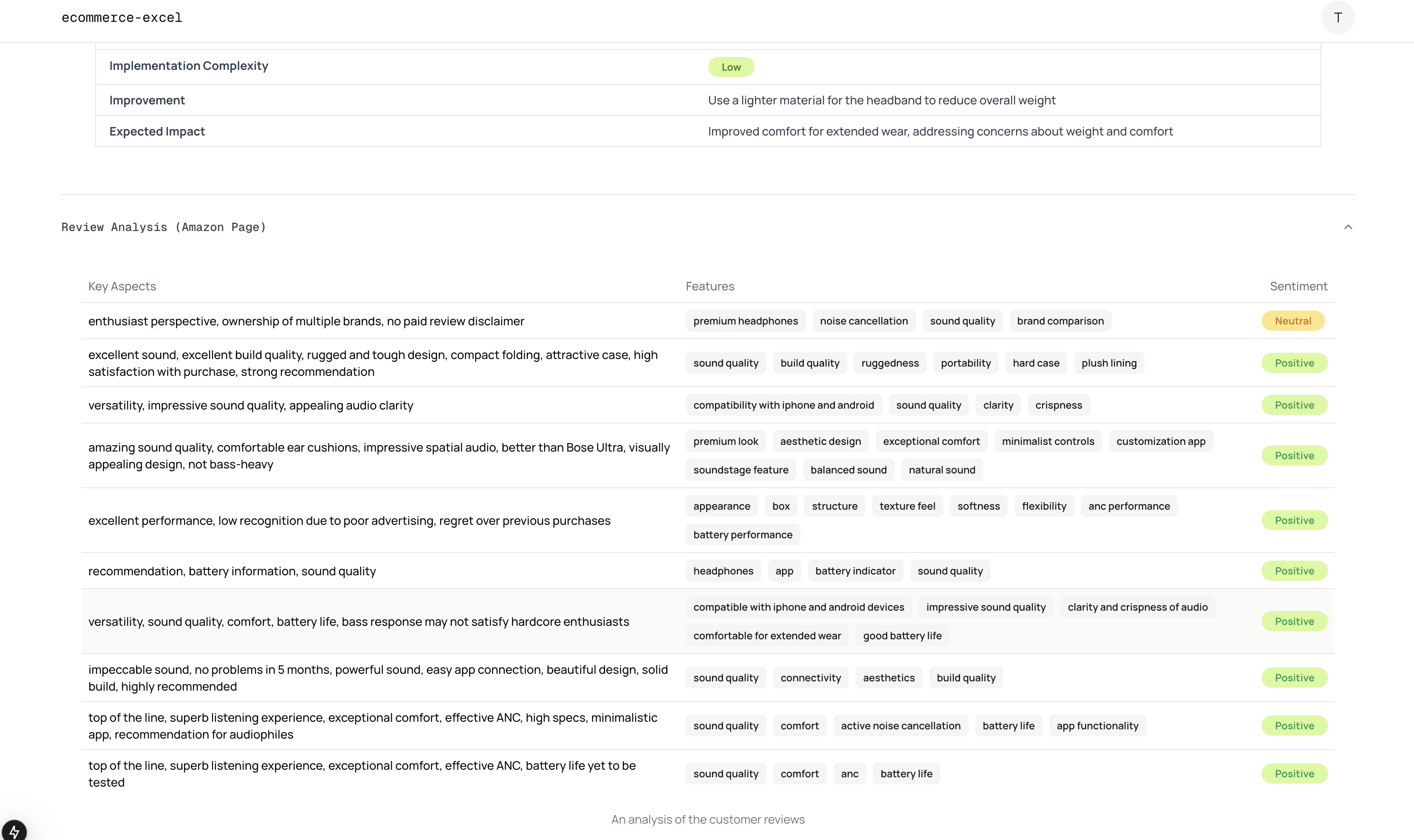
This agent uses LLMs to:
- Analyze customer reviews
- Detect pain points and negative sentiment
- Identify what aspects of the product need improvement
From this, we generate actionable suggestions for sellers to refine their products or listings based on real customer feedback.
🌐 Web Reviewer Agent
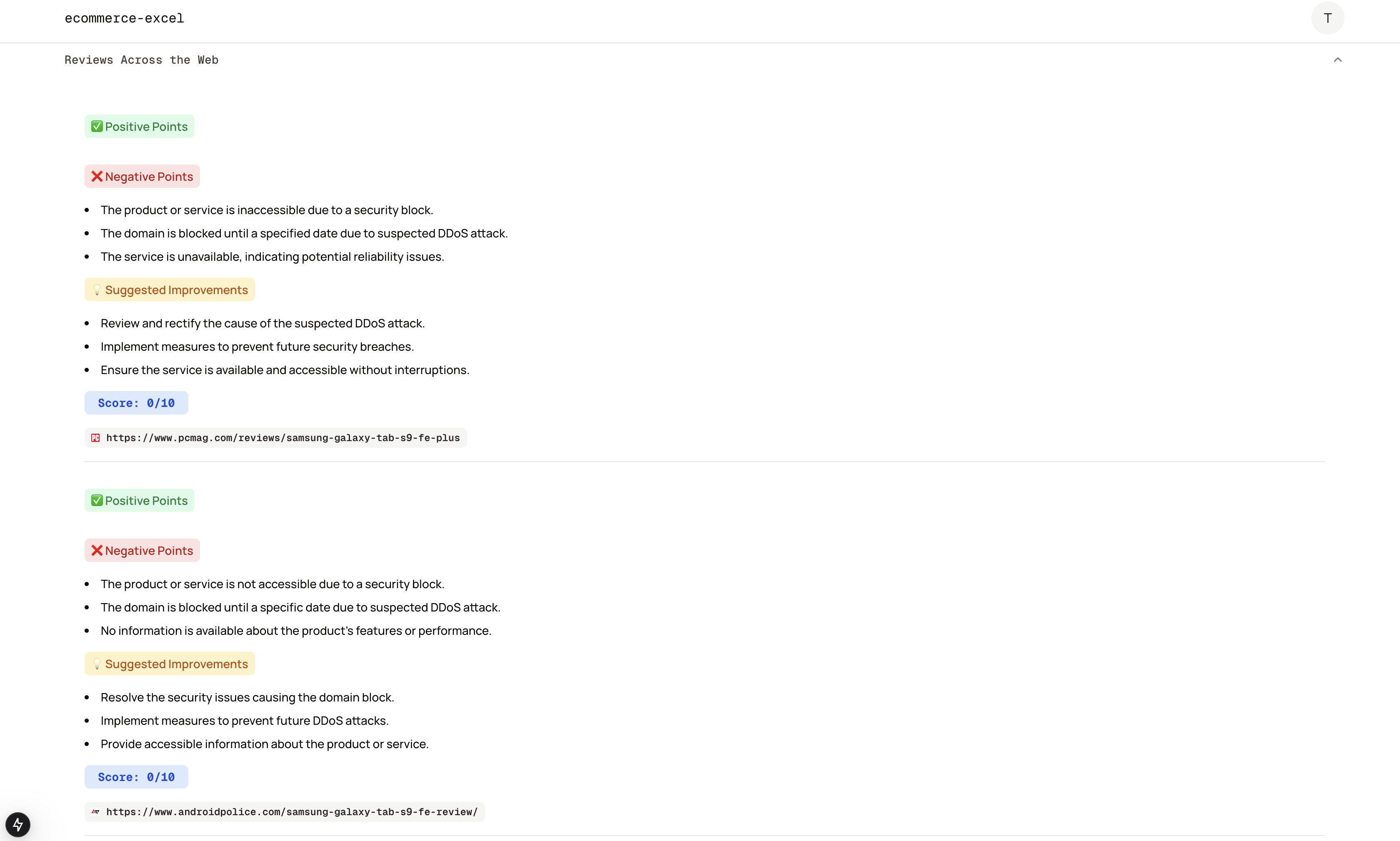
Going beyond Amazon, this agent uses the SerpAPI to:
- Search the web for external reviews and articles
- Aggregate user sentiment from across the internet
- Identify pros, cons, and suggestions from broader audiences
These insights provide a more comprehensive perspective on how the product is perceived in the wider market.
🧠 SWOT Analysis Agent
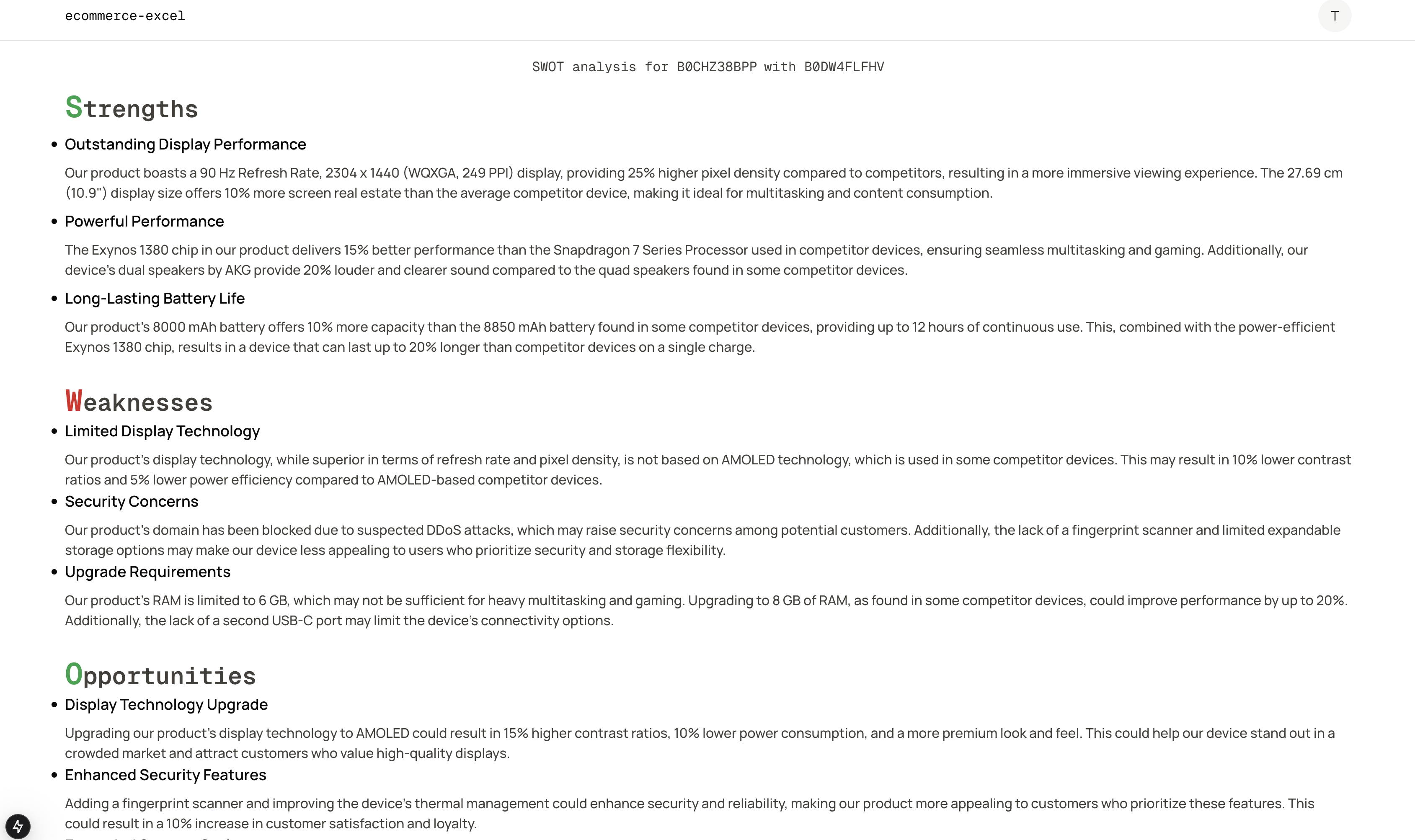
Once a competitor product is provided, this agent:
- Compares it against the scraped and generated data
- Produces a complete SWOT (Strengths, Weaknesses, Opportunities, Threats) analysis
- Offers sellers a strategic view to position their product more effectively in the market
✍️ AI-Generated Copy Agent
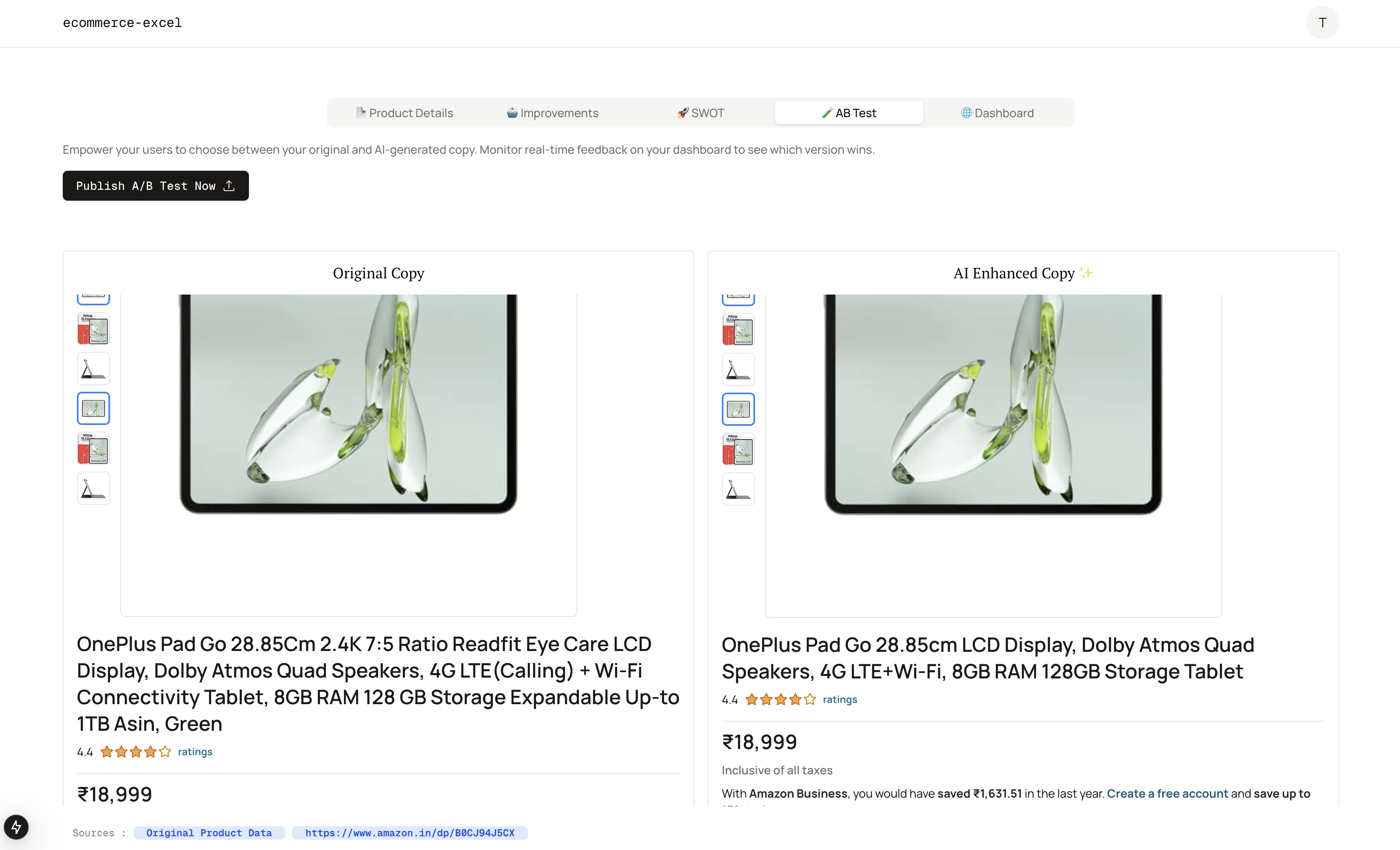
Using the existing product information and broader market analysis, this agent:
- Generates improved listing content
- Enhances the title, bullet points, and descriptions
- Displays a side-by-side comparison with the current listing
Sellers can then pick and choose the copy that best resonates with their brand.
🧪 A/B Testing Agent
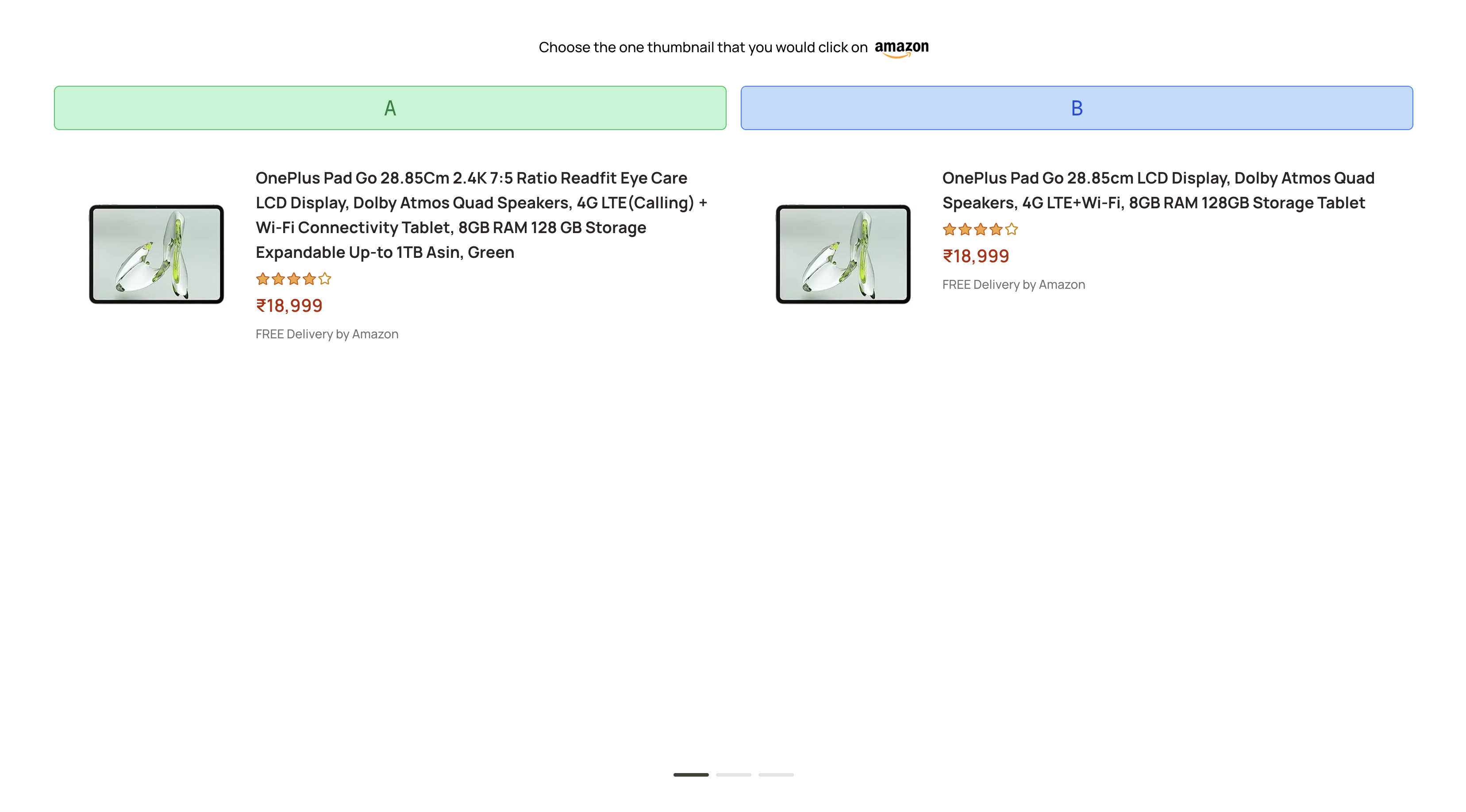
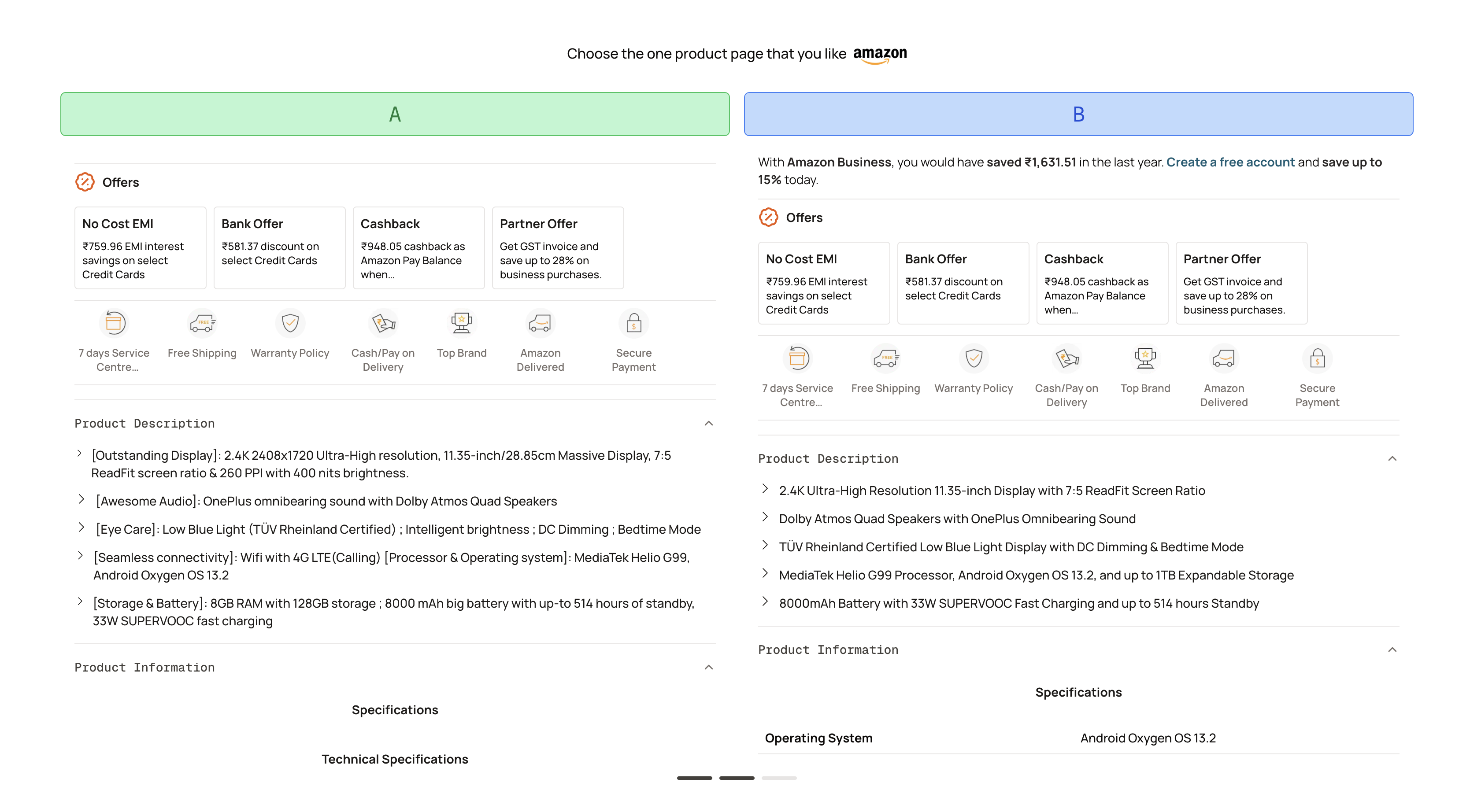
Once a new version of the product listing is ready, sellers can:
- Launch an A/B test via a sharable link
- Share this link with potential customers or testers
- Let users vote on which version they prefer (randomized)
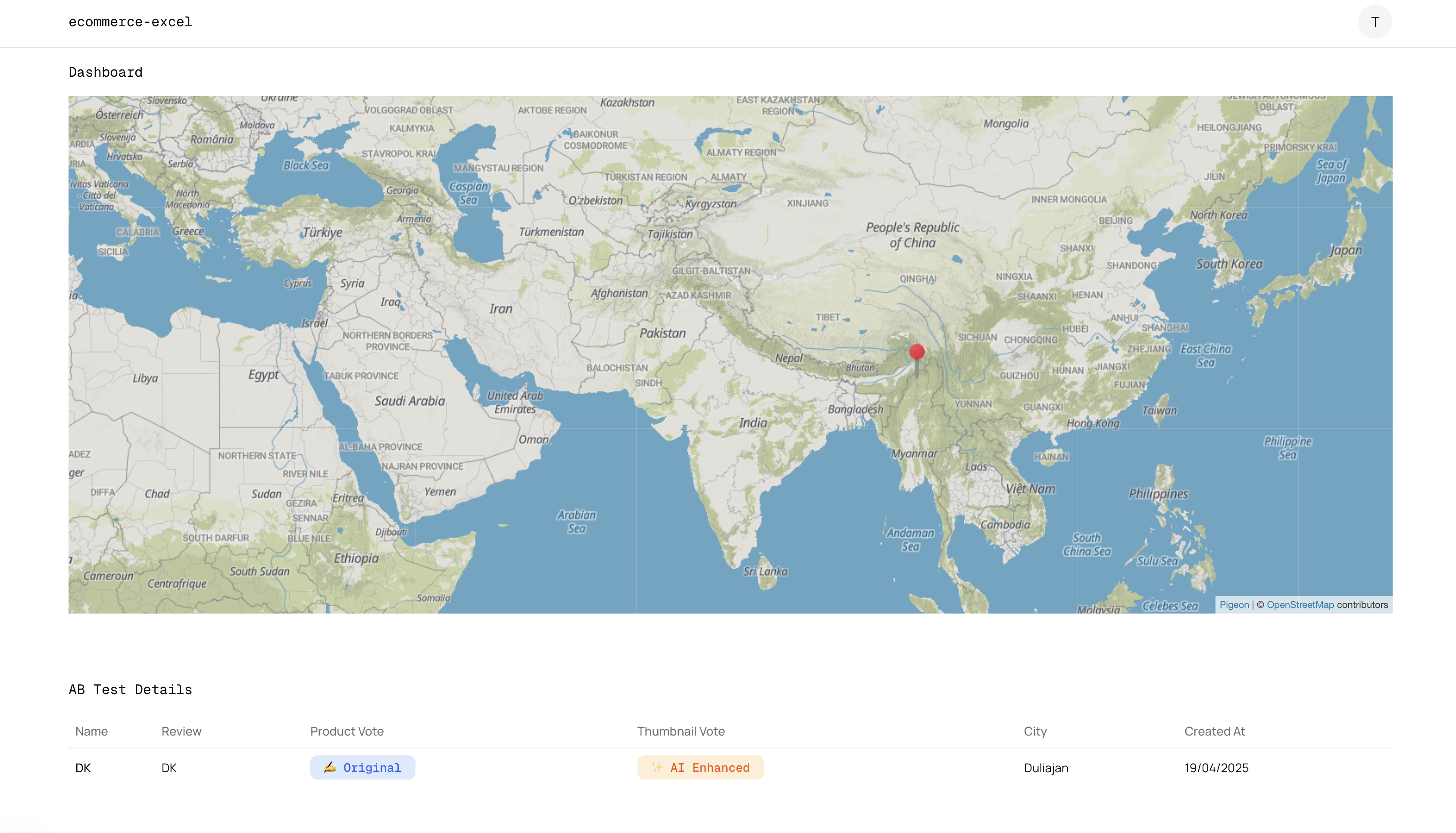
The results from these tests are recorded and visualized in the seller’s dashboard, helping sellers make data-driven decisions.
✅ Summary
Each component of the system is designed to be run once per product and cached to save resources and provide a smooth, fast user experience. With real-time insights and actionable suggestions, our tool empowers Amazon sellers to make smarter, more effective product decisions—all backed by AI.
🕷️ Scraper Agent – Technical Details
The Scraper Agent is a custom-built Python tool that automates the process of extracting product data from Amazon using a combination of Playwright and BeautifulSoup (bs4).
🔧 How It Works
Given a product ASIN, the scraper:
- Launches a headless browser using Playwright to mimic real user interaction and load dynamic content.
- Navigates to the corresponding Amazon product page.
- Waits for all critical elements to load (title, images, price, reviews, etc.).
- Parses the HTML using BeautifulSoup to extract:
- Product Title
- Price
- Description
- Bullet Points
- Images
- Reviews
- Technical Details
The scraped data is then saved to a database, and only scraped once per ASIN to minimize load and prevent duplicate work.
📦 The scraper is also available as a standalone Python package on PyPI with over 7K downloads.
👉 PyPI Package Link_
⚠️ Known Issues & Limitations
While the scraper performs well locally (with a ~70% success rate), it faces reliability issues in production when deployed on EC2:
- Amazon blocks scraper traffic from known server IPs, leading to failed loads or captchas.
- Rotating user-agents and adding delay helps, but isn't always sufficient.
- CAPTCHA-solving or proxy rotation hasn’t yet been fully integrated into the deployed version.
🗂️ Product Database View
A dedicated https://excel.borborah.xyz/products route in the app dashboard lists all previously scraped ASINs. This view acts as both a:
- Record of processed products
- Cache layer to avoid re-scraping and reduce load
This route allows users to browse existing product data and avoids unnecessary scraping.
In the next section, we’ll dive into the Product Enhancement Agent, where LLMs begin turning raw data into actionable insights.
🧠 Product Enhancement & Web Review Agents – Technical Details
Our system uses multiple LLM-powered agents to analyze customer sentiment, extract key features, and recommend data-driven improvements to product listings. These agents operate sequentially and rely on real customer input as well as web content to guide optimization.
All LLM tasks are orchestrated using LangChain for modular and reusable pipelines.
🛠️ Product Enhancement Agent
This agent is powered by LLaMA 4 (Maverick variant) and performs a two-step pipeline:
Step 1: Sentiment Analysis & Feature Extraction
The agent takes Amazon customer reviews as input and uses the LLM to:
- Analyze the sentiment of the reviews (positive, negative, neutral)
- Extract key features mentioned by customers (e.g., build quality, delivery time, usability)
Example Input Review:
“The product looks great but the battery life barely lasts a day. Also, the packaging felt very cheap.”
Extracted Output:
- Sentiment: Mixed/Negative
- Features Mentioned: Battery life, Packaging quality, Aesthetics
Step 2: Suggesting Improvements
Using the extracted features and product information (title, bullets, description), another LLaMA 4 Maverick agent suggests specific, actionable improvements.
Example Output:
- “Consider enhancing battery life or offering a clear disclaimer.”
- “Improve packaging aesthetics to match premium appearance.”
These suggestions are stored in the DB and reused in the copy generation and SWOT analysis stages.
🌐 Web Reviewer Agent
Some insights go beyond Amazon reviews. This is where the Web Reviewer Agent steps in:
Step 1: Title Rewriting for Search
Amazon titles are often long and messy. Before querying the web, we run the product title through an LLM that:
- Synthesizes a shorter, cleaner title
- Adds the keyword
"review"to the end
Example:
Original: XYZ Smartwatch with AMOLED Display and 7-Day Battery – Compatible with Android & iOS
Query String: XYZ Smartwatch review
Step 2: Web Search & Content Scraping
We then use the SerpAPI to search Google for relevant reviews:
- Top 2 organic result URLs are scraped
- Content is extracted using a headless browser + HTML parser
Step 3: LLM-Based Summarization & Improvement Suggestions
The text content is passed to LLaMA 4 which:
- Identifies key sentiments and trends across external reviews
- Suggests pros, cons, and additional improvement opportunities
This gives the seller a broader market view, especially when the Amazon review base is small or biased.
All data (reviews, insights, suggestions) is stored once per product and reused in downstream components like SWOT analysis and AI copy generation, ensuring both speed and cost efficiency.
✨ AI-Generated Copy & A/B Testing Agent – Technical Details
The AI-Generated Copy Agent creates enhanced product listing copy based on insights from the previous steps. The A/B Testing Agent then allows the seller to test multiple versions of the product listing in real-time, monitor user engagement, and make data-driven decisions on which copy performs best.
🧠 How It Works
Step 1: AI-Generated Copy Creation
- The agent uses LLaMA 4 to generate an enhanced product description, bullet points, and title, using the gathered data (product features, sentiment analysis, suggested improvements, and competitor insights).
- It creates two versions of the copy:
- Current Version: The original product listing as it currently appears on Amazon.
- AI-Enhanced Version: A rewritten, optimized version based on the insights and suggestions from the previous steps.
Example:
Current Version:
- "XYZ Smartwatch with AMOLED Display, 7-Day Battery Life, Compatible with Android & iOS, Available in Black and Silver"
AI-Enhanced Version:
- "XYZ Smartwatch – Sleek AMOLED Display, 7-Day Battery Life, Fast Charging, Compatible with Android & iOS. Available in Premium Black and Elegant Silver."
Step 2: Present to User for Approval
- The user is presented with both versions of the copy on the dashboard.
- The seller can review the AI-enhanced version and decide if it aligns with their branding and goals.
Step 3: A/B Testing Deployment
- If the user approves the AI-enhanced version, they can deploy the A/B test to a group of test users.
- A unique link is generated for each version of the copy:
- Version A (Current): The original listing copy
- Version B (AI-Enhanced): The optimized, AI-generated copy
Step 4: User Engagement & Tracking
- Users click on one of the links to view the product listing. The system tracks:
- Click-through rate (CTR)
- Engagement time
- Geolocation and IP Tracking: See where users are located, and which version they clicked, through IP geolocation and maps.
- Real-time Dashboard: Sellers can see a live feed of which version is performing better, including user demographics and geographic information.
Step 5: Feedback Loop & Final Adjustments
- If the AI-Enhanced Version shows more clicks and engagement, the seller can update the listing directly on Amazon.
- If the Current Version performs better, the seller can either refine the AI-generated copy or stick with the original listing.
- All metrics are saved in the dashboard, where the seller can review the test results and make a data-driven decision on which version to keep.
📍 Geo-Location & IP Tracking
- The dashboard not only displays which version is performing better but also maps user activity based on their location and IP address.
- This allows the seller to:
- Understand where the test users are from (country, state, city)
- Identify potential markets for expansion
- See which regions prefer which version of the copy
The real-time tracking helps optimize the product listing and marketing strategy on a global scale.
📊 Results & Updates
Once the A/B test is complete, the system automatically calculates which version has higher engagement, conversion rates, and overall success. The seller can then:
- Update the product listing on Amazon with the winning copy.
- Continuously monitor the performance of the new listing via the dashboard, ensuring the best possible version is always live.
This iterative process ensures that the seller’s product page is continuously optimized for maximum conversion and tailored to user preferences.
This concludes the technical breakdown of the AI-Generated Copy and A/B Testing process. The AI Copy agent and A/B Testing agent work together to optimize product listings using real-world data and user feedback.